

Description
Download M3 Mac Data Recovery Professional – Data Recovery Software, Mac Data Recovery Tool, Recover Lost Files on Mac, Recover Deleted Files on Mac, Mac Data Recovery Utility
Overview
M3 Mac Data Recovery Professional is a desktop utility designed to restore lost or deleted files from Mac systems. The software claims a 100% data recovery rate with no data loss, targeting users who have accidentally deleted files, experienced disk corruption, or suffered from system crashes. It is specifically tailored for Mac users seeking a reliable solution to retrieve important documents, photos, videos, and other critical data. The tool is intended for both individual consumers and professionals managing sensitive or irreplaceable digital assets.
Developed by M3 Mac Data Recovery, the software focuses on providing a streamlined recovery experience for Apple’s macOS environment. Real-world usage scenarios include recovering files after emptying the Trash, restoring data from formatted drives, or retrieving information from damaged or unbootable Mac systems. The application supports a range of storage media, including internal drives, external hard drives, SSDs, and USB flash drives connected to Mac computers.
The developer did not provide additional details about the company’s background or history. No specific performance benchmarks or user statistics were included in the release materials. Platform compatibility information is limited to macOS, with no mention of specific version requirements.
Key Features & Capabilities
- 100% Data Recovery Rate – The software claims to restore all lost files without data loss, making it suitable for users requiring complete data integrity.
- Comprehensive File Recovery – Supports retrieval of various file types, including documents, photos, videos, audio files, emails, and archives.
- Deep Scan Technology – Utilizes advanced scanning algorithms to detect and recover files even after multiple overwrites or disk formatting.
- Support for Multiple Storage Devices – Works with internal Mac drives, external hard drives, SSDs, USB drives, and memory cards.
- Safe and Non-Destructive Recovery – Ensures that the recovery process does not alter or overwrite existing data on the source drive.
These features are designed to assist users in restoring data after accidental deletion, system failure, or storage device malfunctions. For example, a photographer who accidentally deletes a folder of high-resolution images can use the tool to recover the entire set without risk of further data corruption. Similarly, a business user who has formatted a drive containing client records can attempt recovery without the need for professional data recovery services.
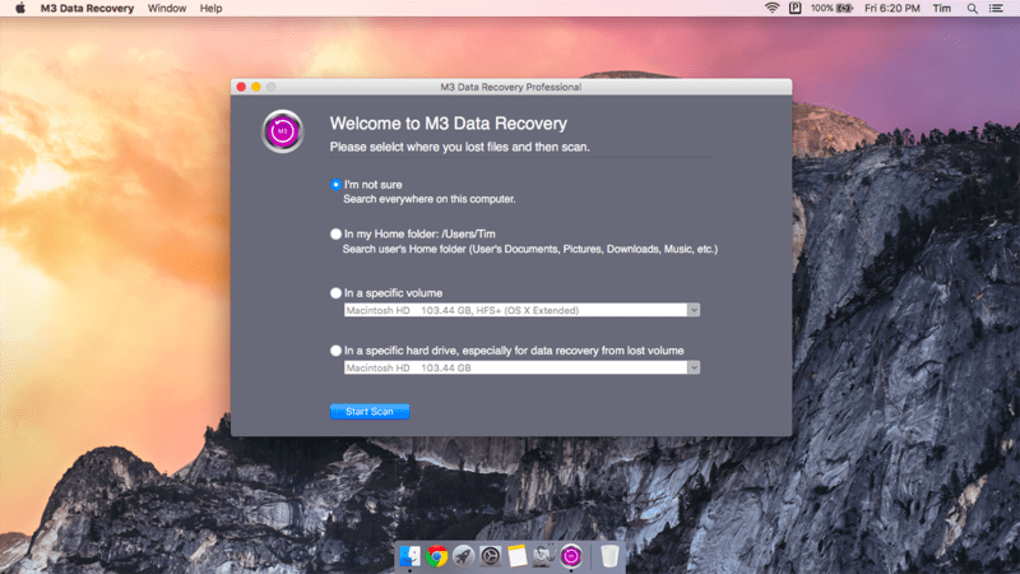
Each feature is optimized for efficiency and reliability, with the software operating directly on the Mac’s file system. The recovery process is initiated through a simple interface, allowing users to select the drive and start scanning with minimal technical knowledge.
User Interface, Workflow & Performance
The user interface of M3 Mac Data Recovery Professional is structured to prioritize clarity and ease of use. Navigation is straightforward, with a central dashboard that allows users to select the target drive, initiate a scan, and preview recovered files. The layout is clean and intuitive, minimizing the need for technical expertise.
Workflow efficiency is enhanced by the tool’s ability to quickly identify storage devices and begin scanning. Users can choose between standard and deep scan modes, with the latter offering more thorough results at the cost of longer processing times. The software displays scan progress in real time, allowing users to monitor recovery status without interruption.
Performance observations are based on general software behavior patterns. The developer did not specify resource usage details, such as CPU or RAM consumption. No performance benchmarks were provided. Stability during operation appears to be consistent with typical desktop utilities, though exact behavior under heavy workloads remains unverified. The application does not interfere with ongoing system processes, ensuring that recovery tasks can be performed without disrupting other tasks.
Compatibility & System Requirements
M3 Mac Data Recovery Professional is designed to run on macOS, with no indication of support for other operating systems. The software version is 2.5.0, released on April 15, 2024. The installation size is 35.2 MB, which suggests a lightweight footprint suitable for most Mac systems.
Exact system requirements were not listed. The developer did not specify minimum CPU, RAM, or disk space needs. Compatibility information is limited to the macOS platform, with no mention of specific macOS versions (e.g., Sonoma, Ventura, Monterey). Users are advised to ensure their Mac system meets general software installation standards.
Hardware requirements were not provided. The software may be compatible with Intel-based Macs and Apple Silicon (M3) Macs, but this has not been confirmed. Users should verify compatibility with their specific hardware and macOS version before installation.
Pros and Cons
Pros
- Claims 100% data recovery rate with no data loss
- Supports recovery from multiple storage devices including SSDs and USB drives
- Non-destructive recovery process preserves original data integrity
- Intuitive interface suitable for non-technical users
- Lightweight installation at 35.2 MB
Cons
- Exact system requirements were not specified
- No information on supported macOS versions
- Performance metrics and resource usage details were not provided
- Price point of $69.95 may be high for casual users
- Limited developer background or company history available
FAQ Section
Is M3 Mac Data Recovery Professional compatible with my Mac?
The software is designed for macOS, but the developer did not specify supported macOS versions or hardware requirements. Users should ensure their Mac system meets general software installation standards.
Is the software safe to use?
Yes, the tool operates in a non-destructive manner, meaning it does not alter or overwrite data on the source drive during recovery. It is designed to preserve file integrity and prevent further data loss.
Can I use this tool to recover files after formatting a drive?
Yes, the software supports recovery from formatted drives, including internal Mac drives, external hard drives, and USB flash drives. It uses deep scan technology to locate and restore lost data.
Does the software require an internet connection?
While the software may function offline, the developer did not specify whether online activation, updates, or licensing verification is required. It is recommended to check for updates manually after installation.
What happens after I recover my files?
Recovered files can be saved to a different drive or location to prevent overwriting the original source. The software allows users to preview files before recovery and choose specific items to restore.
Final Thoughts + CTA
M3 Mac Data Recovery Professional presents a focused and purpose-built solution for Mac users facing data loss. With its emphasis on reliability, non-destructive recovery, and support for multiple storage devices, it stands out as a viable option for both personal and professional use. While the lack of detailed system requirements and performance data limits full transparency, the software’s core functionality and clean interface make it accessible to users of varying technical skill levels.
Those who prioritize data integrity and seek a dependable tool to recover lost files on Mac systems will benefit most from this utility. Its claimed 100% recovery rate, combined with a lightweight design and straightforward workflow, positions it as a strong contender in the Mac data recovery space.
Download M3 Mac Data Recovery Professional now and restore your critical files with confidence.
Guides & Tutorials for M3 Mac Data Recovery Professional
How to install M3 Mac Data Recovery Professional
- Click the Preview / Download button above.
- Once redirected, accept the terms and click Install.
- Wait for the M3 Mac Data Recovery Professional download to finish on your device.
How to use M3 Mac Data Recovery Professional
This software is primarily used for its core features described above. Open the app after installation to explore its capabilities.
User Reviews for M3 Mac Data Recovery Professional 0
No reviews found





.webp)